# Deploy a SvelteKit Site as Static Files: adapter-static and Prerendering
To deploy a SvelteKit site on Light Cloud as static files, create it with `adapter-static`, add `export const prerender = true` to `src/routes/+layout.ts`, push it to GitHub and click **Deploy** in the console. Light Cloud detects SvelteKit and adapter-static, runs `npm run build` and serves the `build` folder from the edge. Each page is a real HTML file, so `/about` opened directly shows the About page.
In my run the deploy took 30 seconds.
## What you will build
A two-page SvelteKit site, Home and About, prerendered to HTML at build time and live on a `light-cloud.io` address. It follows the visitor's light or dark system setting.

Live demo: [main-tutorial-sveltekit-app-examples.light-cloud.io](https://main-tutorial-sveltekit-app-examples.light-cloud.io). Source code: [github.com/light-cloud-com/tutorial-sveltekit-app](https://github.com/light-cloud-com/tutorial-sveltekit-app).
## Static or server: which adapter?
SvelteKit builds for a target through an adapter. The two that matter here:
- **adapter-static** builds every page to HTML ahead of time. Nothing runs on a server; the files are served from the edge. Good for sites, docs, blogs and portfolios, and it runs on the free plan. This guide uses it.
- **adapter-node** builds a Node.js server that renders pages on each request. You need it for form actions, server `load` functions that read per-visitor data, or API routes. On Light Cloud that runs as a container.
If you are not sure, start static. Moving to adapter-node later is a change of adapter, not a rewrite.
## Before you start
- [Node.js](https://nodejs.org/) 20.19 or later, or 22.12 or later (what Vite 8 requires); I used Node.js 24.
- [Git](https://git-scm.com/downloads) and a [GitHub](https://github.com/) account.
- A free Light Cloud account at [console.light-cloud.com](https://console.light-cloud.com) with GitHub connected.
- On Windows, use [PowerShell 7](https://learn.microsoft.com/en-us/powershell/scripting/install/installing-powershell-on-windows). The last check uses [curl](https://curl.se/) (on Windows, [`curl.exe`](https://curl.se/windows/), which ships with Windows 10 and 11).
## Step 1: Create the SvelteKit app
The [Svelte CLI](https://svelte.dev/docs/cli/sv-create), `sv`, can add adapter-static while it creates the project:
```shell os="macOS,Linux"
$ npx sv@latest create tutorial-sveltekit-app --template minimal --types ts --add sveltekit-adapter="adapter:static" --install npm
┌ Welcome to the Svelte CLI! (v0.17.1)
│
◆ Project created
│
◆ Successfully setup add-ons: sveltekit-adapter
│
◆ Successfully installed dependencies with npm
│
└ You're all set!
```
```shell os="Windows"
PS> npx sv@latest create tutorial-sveltekit-app --template minimal --types ts --add sveltekit-adapter="adapter:static" --install npm
┌ Welcome to the Svelte CLI! (v0.17.1)
│
◆ Project created
│
◆ Successfully setup add-ons: sveltekit-adapter
│
◆ Successfully installed dependencies with npm
│
└ You're all set!
```
`--template minimal` gives an almost empty site and `--types ts` sets up TypeScript. Output is trimmed.
Looking for `svelte.config.js`? New projects no longer have one. The adapter is set in `vite.config.ts`:
```typescript title="vite.config.ts"
import adapter from '@sveltejs/adapter-static';
import { sveltekit } from '@sveltejs/kit/vite';
import { defineConfig } from 'vite';
export default defineConfig({
plugins: [
sveltekit({
compilerOptions: {
// Force runes mode for the project, except for libraries. Can be removed in svelte 6.
runes: ({ filename }) => filename.split(/[/\\]/).includes('node_modules') ? undefined : true
},
adapter: adapter()
})
]
});
```
## Step 2: Turn on prerendering
adapter-static can only publish pages that were built ahead of time, and SvelteKit does not prerender by default. Build the new project as it is and it stops with `Error: Encountered dynamic routes` (the full message is under [Troubleshooting](#troubleshooting)).
One line fixes it for the whole site. Create this file:
```typescript title="src/routes/+layout.ts"
export const prerender = true;
```
## Step 3: Add the pages
A shared layout with two links and a few styles. `color-scheme: light dark` lets the browser follow the visitor's system theme:
```svelte title="src/routes/+layout.svelte"
{@render children()}
```
Replace the starter home page:
```svelte title="src/routes/+page.svelte"
Home
Hello from Light Cloud
A SvelteKit site, prerendered with adapter-static.
```
In SvelteKit a folder is a route, so the About page lives in an `about` folder:
```svelte title="src/routes/about/+page.svelte"
About
About
This page was prerendered to HTML at build time and is served from the edge.
```
## Step 4: Run it and build it
```shell os="macOS,Linux"
$ npm run dev
VITE v8.3.1 ready in 441 ms
➜ Local: http://localhost:5173/
$ npm run build
✓ built in 974ms
> Using @sveltejs/adapter-static
Wrote site to "build"
✔ done
$ ls build
_app
about.html
index.html
robots.txt
```
```shell os="Windows"
PS> npm run dev
VITE v8.3.1 ready in 441 ms
➜ Local: http://localhost:5173/
PS> npm run build
✓ built in 974ms
> Using @sveltejs/adapter-static
Wrote site to "build"
✔ done
PS> Get-ChildItem build -Name
_app
about.html
index.html
robots.txt
```
Open `http://localhost:5173`, click between the two pages, then stop the server with Ctrl+C before you build. Build output is trimmed.
The `build` folder is the whole site: one HTML file per page, plus the JavaScript in `_app` that makes links switch pages without a reload.
## Step 5: Push it to GitHub
```shell os="macOS,Linux"
$ git init -b main
$ git add -A
$ git commit -m "SvelteKit site with adapter-static"
# Create an empty repository named tutorial-sveltekit-app on github.com/new first.
$ git remote add origin https://github.com/YOUR-USERNAME/tutorial-sveltekit-app.git
$ git push -u origin main
To https://github.com/YOUR-USERNAME/tutorial-sveltekit-app.git
* [new branch] main -> main
branch 'main' set up to track 'origin/main'.
```
```shell os="Windows"
PS> git init -b main
PS> git add -A
PS> git commit -m "SvelteKit site with adapter-static"
# Create an empty repository named tutorial-sveltekit-app on github.com/new first.
PS> git remote add origin https://github.com/YOUR-USERNAME/tutorial-sveltekit-app.git
PS> git push -u origin main
To https://github.com/YOUR-USERNAME/tutorial-sveltekit-app.git
* [new branch] main -> main
branch 'main' set up to track 'origin/main'.
```
The project's `.gitignore` already keeps `node_modules`, `.svelte-kit` and `build` out of Git.
## Step 6: Deploy it
1. In the [Light Cloud console](https://console.light-cloud.com), click **New...**, then **Deploy from GitHub**.
2. Search for `tutorial-sveltekit-app` and click it.
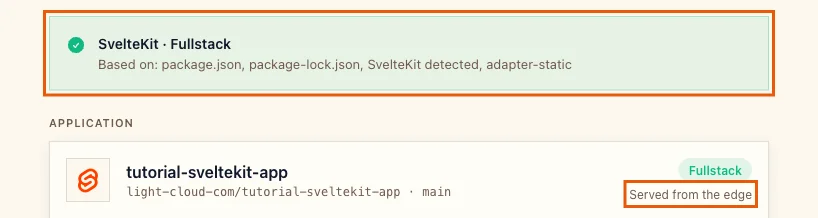
Light Cloud shows **SvelteKit** and, in the reasons, **adapter-static**, with **Served from the edge**. It found adapter-static in `package.json`, so it deploys the site as static files rather than as a server.
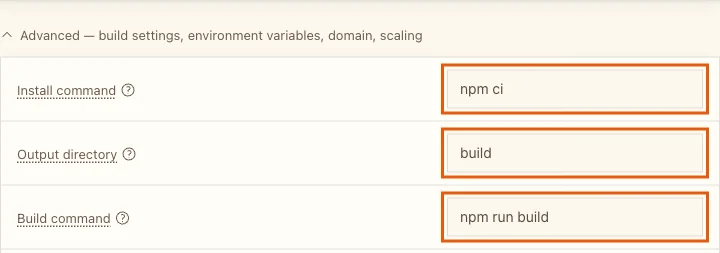
3. Optional: under **Advanced - build settings, environment variables, domain, scaling** you can see `npm ci`, `npm run build` and the output directory `build`. Nothing to change.
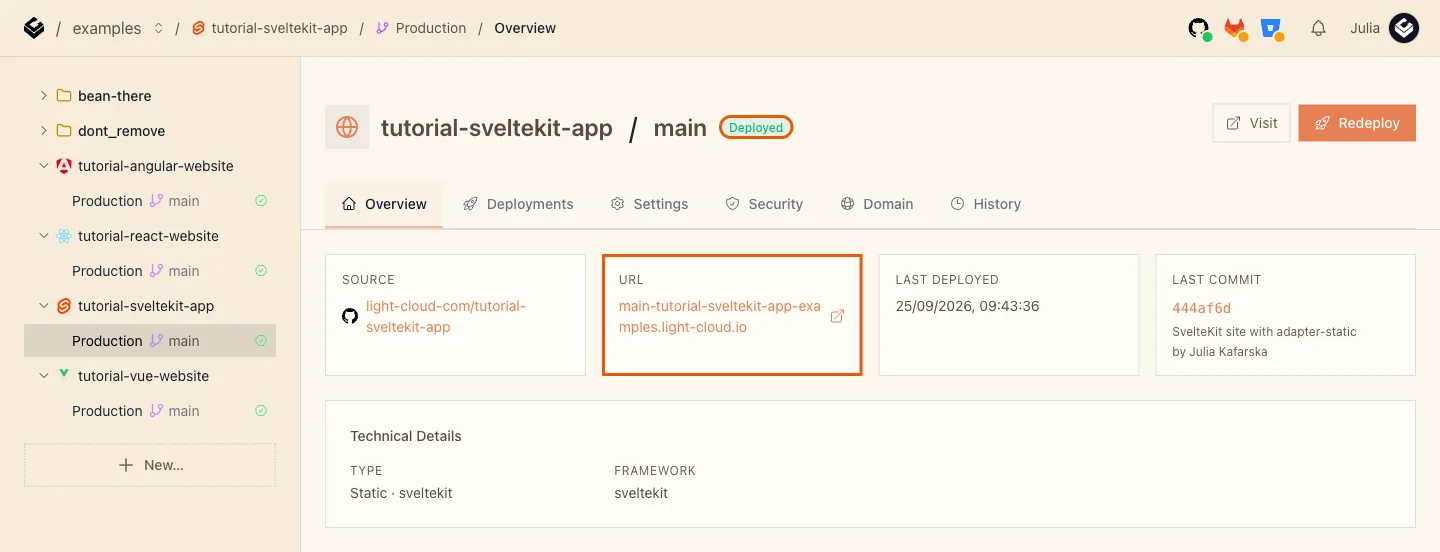
4. Click **Deploy** and wait for **Deployed** (30 seconds in my run). Open the address from the **URL** card:
From now on, every push to `main` redeploys the site by itself.
## Step 7: Open a page directly
Open `https://main-tutorial-sveltekit-app-yourworkspace.light-cloud.io/about` in a new tab, or refresh the page while on About. Light Cloud serves `about.html` for `/about`, so the page comes straight from the prerendered file:

To see that the page really comes prerendered, right-click it and choose **View Page Source**: the HTML already contains `
About
`, before any JavaScript runs.
`/about/` with a trailing slash works too. A path with no page, such as `/nope`, falls back to `index.html`.
## Troubleshooting
### Error: Encountered dynamic routes
```text
@sveltejs/adapter-static: all routes must be fully prerenderable, but found the following routes that are dynamic:
- src/routes/
error during build:
Error: Encountered dynamic routes
```
Prerendering is off. Add `export const prerender = true;` to `src/routes/+layout.ts` (Step 2), build again, commit and push.