Too Many Connections? Count Them and Size Your Pool
Find out how many connections your Light Cloud PostgreSQL database allows, see who is using them, and size your app's pool so it never runs out.



On this pageShowHide
A Light Cloud Dev PostgreSQL database allows 10 connections per database user. When an app opens more, the extra connections fail with too many connections for role. The fix is arithmetic: keep your pool size times your app's Max instances, plus the tools you connect with, below 10. This guide shows how to check the limit, see who holds connections, and size the pool.
This is part 8, the last part, of the database series. It uses bookshop-db from part 1 and the bookshop-api app from part 6.
What you will do
- Check the connection limit.
- See which connections are open, and who opened them.
- See what happens at the limit.
- Size the pool and Max instances so it does not happen.
Before you start
- The
bookshop-dbdatabase from part 1. - Optionally, an app that uses it, like
bookshop-apifrom part 6. - A Light Cloud account on the Lite plan or higher.
Step 1: Check the limit
Open bookshop-db, Data, and run this in the query box (part 3 explains the box):
SELECT rolconnlimit FROM pg_roles WHERE rolname = current_user;
On a Dev database it returns 10. That is the limit for your database user, which is what your apps, psql and the console all connect as.
Step 2: See who is connected
pg_stat_activity lists every open connection. Group yours by application and state:
SELECT application_name, state, count(*) AS connections
FROM pg_stat_activity
WHERE usename = current_user
GROUP BY application_name, state
ORDER BY connections DESC;
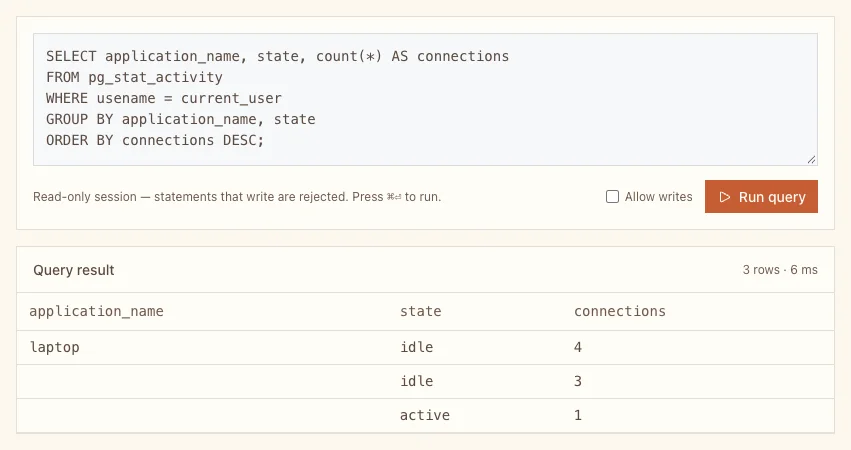
In my run that was 8 of the 10:
- laptop, idle, 4: a script on a laptop holding four connections. It set
application_name, so it is easy to spot. - idle, 3: the API's pool, after a burst of requests. Its pool has
max: 3, and all three stayed open, idle, ready for the next request. - active, 1: the query you are running right now; the console needs a connection too.
idle connections count as much as busy ones.
To make your own app easy to spot, give it a name. With node-postgres, add application_name to the pool options:
const pool = new pg.Pool({
  connectionString: process.env.DATABASE_URL,
  max: 3,
  application_name: "bookshop-api",
});
Step 3: What happens at the limit
I held all 10 connections from the laptop and called the API:
$ curl https://main-bookshop-api-yourworkspace.light-cloud.io/health
{"status":"error","database":"too many connections for role \"u_******\""}PS> curl.exe https://main-bookshop-api-yourworkspace.light-cloud.io/health
{"status":"error","database":"too many connections for role \"u_******\""}The health check answered 503, and /books answered 500. The app's Logs tab shows the same error:
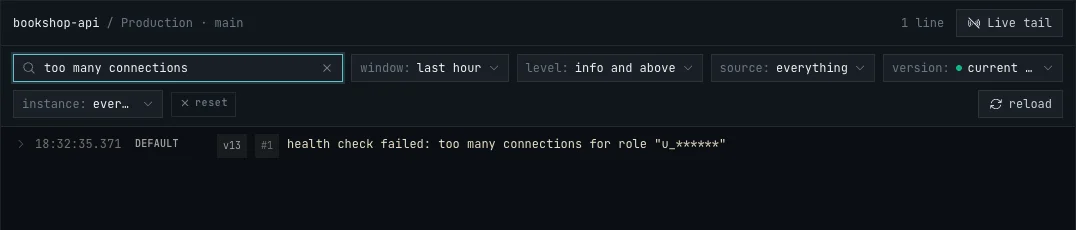
Nothing is broken: as soon as connections are released, new ones succeed again. But while the limit is reached, every request that needs a new connection fails.
Step 4: Size the pool
Every running instance of your app has its own pool. So the most connections an app can open is:
pool max x Max instances
Add what else connects: psql sessions, GUI tools, scheduled jobs, the console's query box (1 while you use it), and a second app if it shares the database. Keep the total at 10 or below:
| Pool max | Max instances | App at most | Left for tools |
|---|---|---|---|
| 3 | 3 | 9 | 1 |
| 2 | 4 | 8 | 2 |
| 10 (node-postgres default) | 10 (Light Cloud default) | 100 | none |
The last row is what you get without setting anything, and why the limit catches people out: node-postgres opens up to 10 connections per pool, and a new app on Light Cloud may scale to 10 instances.
Set Max instances in the environment's Settings, under Container Configuration. Instance counts apply immediately, without a redeploy:
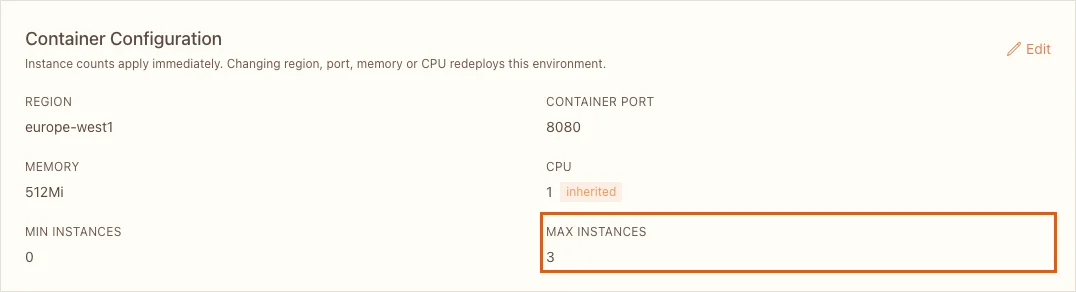
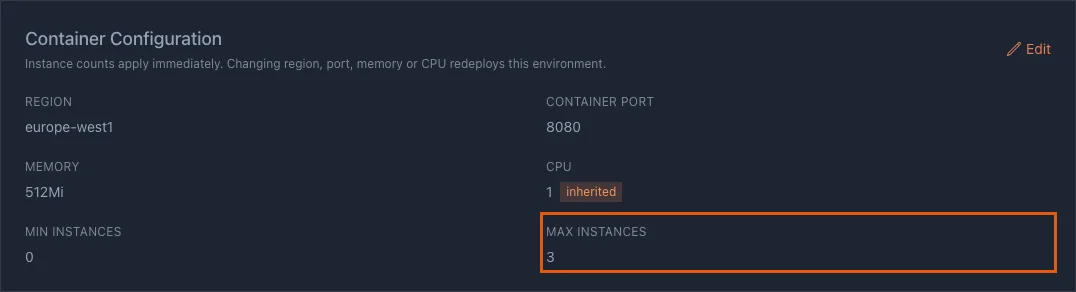
Set the pool size in code, as max in node-postgres, or the equivalent in your stack, such as connection_limit in the Prisma connection string or pool_size in SQLAlchemy. A small pool is rarely the bottleneck: my API ran fine with 3 connections per instance.
When 10 is not enough
- Close idle connections sooner. node-postgres closes idle pool connections after 10 seconds (
idleTimeoutMillis). Other tools keep them longer; check their settings. - Use a bigger database. Starter and Pro databases run on an instance of their own. Run the query from Step 1 on them to see their limit.
- Share one app. If several small services use the same database, have one of them own it and let the others call its API.
Troubleshooting
too many connections for role "u_..."
The database user has used all its connections. Run the query from Step 2 to see who holds them, close tools you left open, and lower the pool size or Max instances.